Genie Code tips and tricks for data analysts
- Genie Code helps data analysts with SQL queries, code explanations, and error fixing.
- Genie Code can address common data analyst challenges including SQL dialect conversion, query refactoring, writing window functions, converting JSON to structured tables, and optimizing SQL queries.
- This post provides best practices, such as @ mentioning table names, adding row-level examples in Unity Catalog comments, and using Cmd+I for quick iteration.
Genie Code is a context-aware AI assistant natively available in the Databricks Data Intelligence Platform. It is designed to simplify SQL and data analysis by helping generate SQL queries, explain complex code, and automatically fix errors.
In this blog, we follow up on Genie Code Tips & Tricks for Data Engineers, shifting our focus to SQL and data analysts. We’ll explore how Genie Code reinforces best practices, improves performance, and helps transform semi-structured data into usable formats. Stay tuned for future posts covering data scientists and more, as we explore how Genie Code is democratizing data by simplifying complex workflows and making advanced analytics more accessible to everyone.
Best Practices
Below are a few best practices to help analysts use Genie Code more effectively, ensuring more accurate responses, smoother iterations, and improved efficiency.
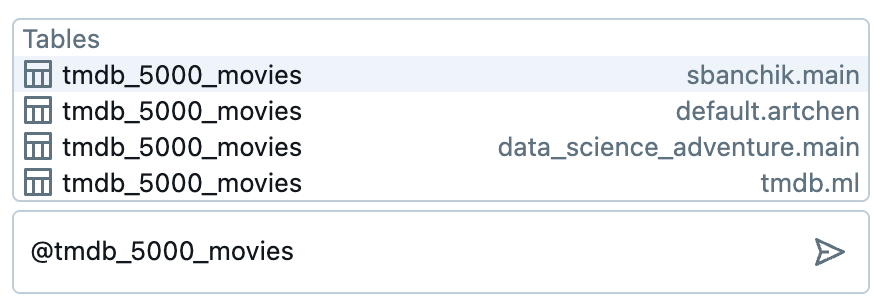
- Use @ mention table names: Be as specific as possible in your prompts and @ mention tables to ensure Genie Code references the correct catalog and schema. This is especially helpful in workspaces with multiple schemas or catalogs containing similarly named tables.
- Add row-level examples in UC comments: As of today, Genie Code only has access to metadata, not actual row-level values. By including representative row-level examples in Unity Catalog comments, analysts can provide Genie Code with additional context, leading to more precise suggestions for tasks like generating regex patterns or parsing JSON structures.
- Keep table descriptions up to date: Regularly refining table descriptions in Unity Catalog enhances Genie Code's understanding of your data model.
- Use Cmd+I for quick iteration: Inline Genie Code is ideal for making targeted adjustments without unnecessary rewrites. Pressing Cmd + I at the end of a cell ensures Genie Code only modifies the code below the cursor, unless specified otherwise. This allows users to iterate quickly on prompts, refine responses, and adjust suggestions without disrupting the rest of their code. Additionally, users can highlight specific lines to fine-tune Genie Code's focus.
- Get examples of advanced functions: When documentation provides only basic use cases, Genie Code can offer more tailored examples based on your specific needs. For instance, if you're working with batch streaming struct aggregation in DLT, you can ask Genie Code for a more detailed implementation, including guidance on applying it to your data, adjusting parameters, and handling edge cases to ensure it works in your workflow.
Common Use Cases
With these best practices in mind, let’s take a closer look at some of the specific challenges SQL and data analysts face daily. From query optimization and handling semi-structured data to generating SQL commands from scratch, the Genie Code simplifies SQL workflows, making data analysis less complex and more efficient.
Converting SQL Dialects
SQL dialects vary across platforms, with differences in functions, syntax, and even core concepts like DDL statements and window functions. Analysts working across multiple environments—such as migrating from Hive to Databricks SQL or translating queries between Postgres, BigQuery, and Unity Catalog—often spend time adapting queries manually.
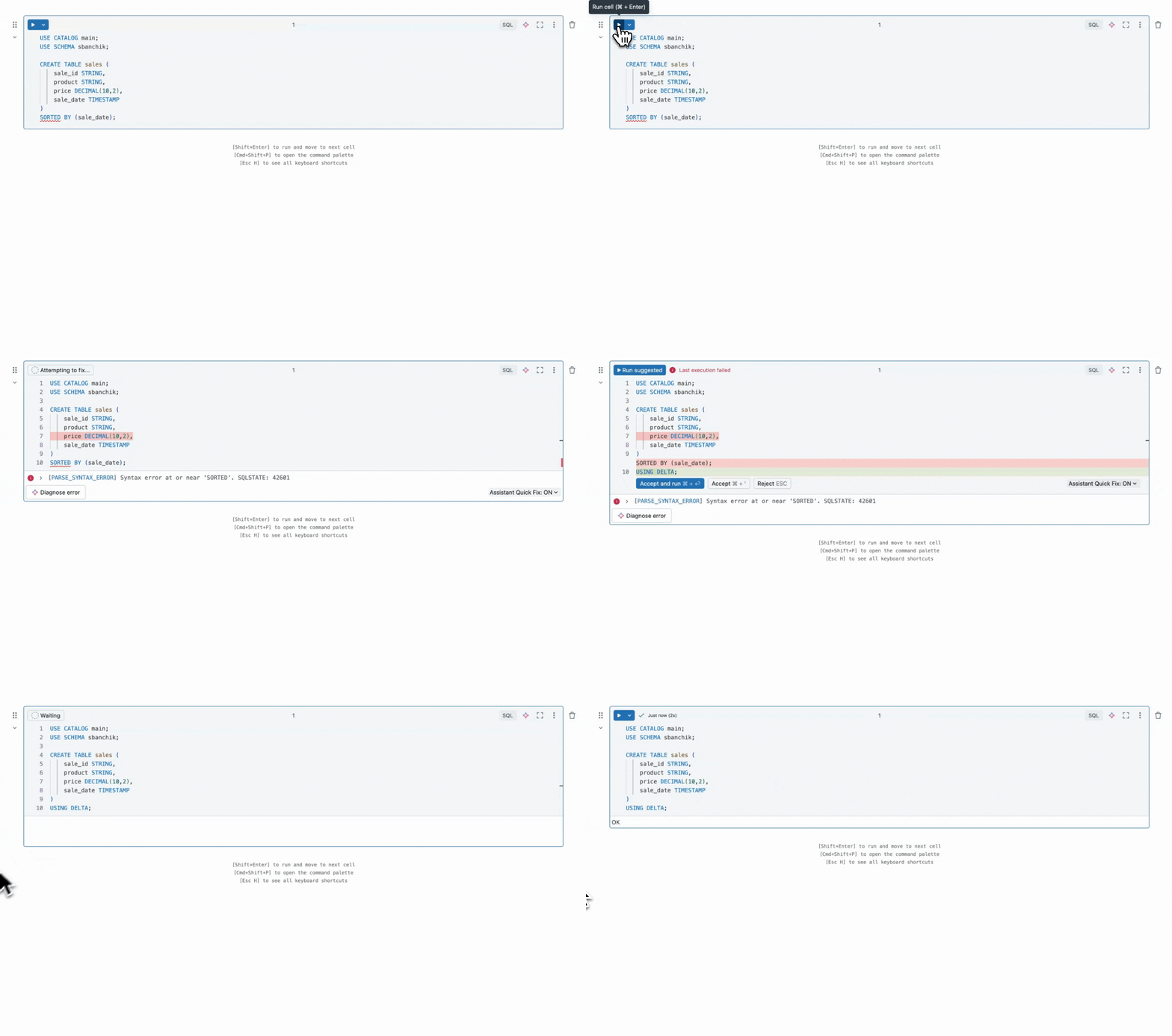
For example, let’s take a look at how Genie Code can generate a Hive DDL into Databricks-compatible SQL. The original query will result in errors because SORTED_BY doesn’t exist in DBSQL. As we can see here Genie Code seamlessly replaced the broken line and replaced it with USING DELTA, ensuring the table is created with Delta Lake, which offers optimized storage and indexing. This allows analysts to migrate Hive queries without manual trial and error.
Refactoring Queries
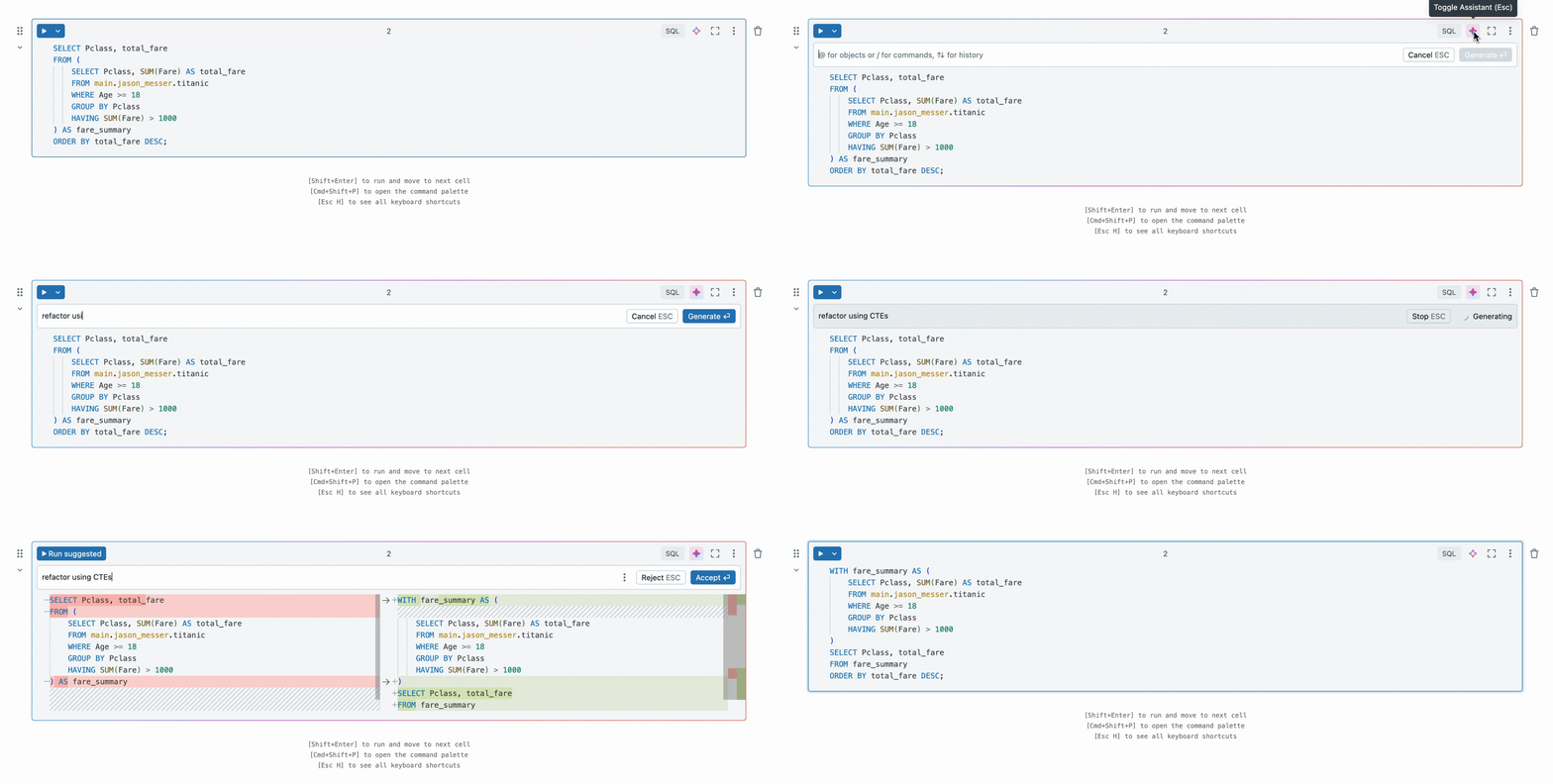
Long, nested SQL queries can be difficult to read, debug, and maintain—especially when they involve deeply nested subqueries or complex CASE WHEN logic. Luckily with Genie Code, analysts can easily refactor these queries into CTEs to improve readability. Let’s take a look at an example where Genie Code converts a deeply nested query into a more structured format using CTEs.
Writing SQL window functions
SQL window functions are traditionally used for ranking, aggregation, and calculating running totals without collapsing rows, but they can be tricky to use correctly. Analysts often struggle with the PARTITION BY and ORDER BY clauses, choosing the right ranking function (RANK, DENSE_RANK, ROW_NUMBER), or implementing cumulative and moving averages efficiently.
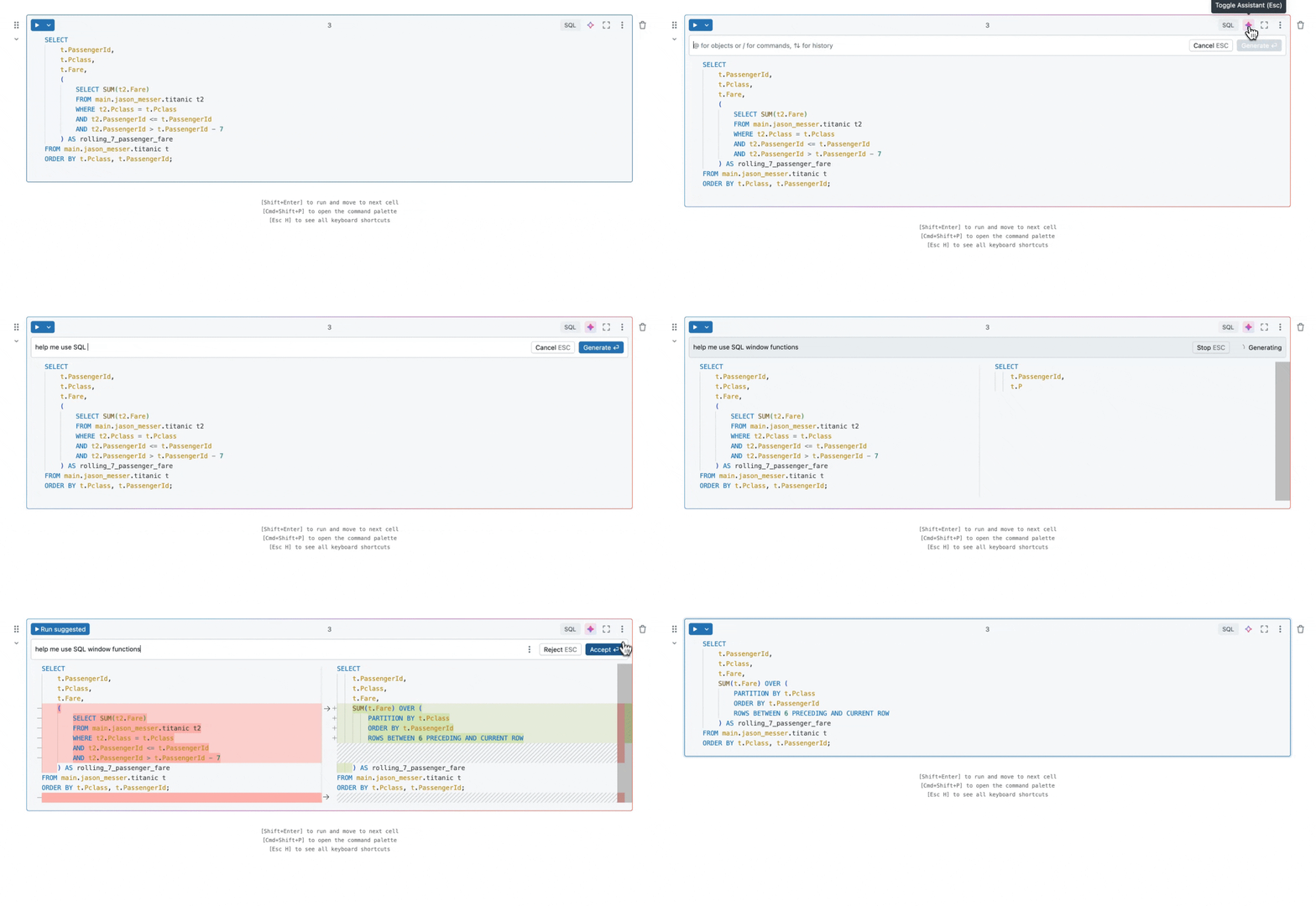
Genie Code helps by generating the correct syntax, explaining function behavior, and suggesting performance optimizations. Let’s see an example where Genie Code calculates a rolling 7-day fare total using a window function.
Converting JSON into Structured Tables
Analysts often work with semi-structured data like JSON, which needs to be transformed into structured tables for efficient querying. Manually extracting fields, defining schemas, and handling nested JSON objects can be time-consuming and error-prone. Since the Genie Code does not have direct access to raw data, adding Unity Catalog metadata, such as table descriptions or column comments, can help improve the accuracy of its suggestions.
In this example, there is a column containing genre data stored as JSON, with both genre IDs and names embedded. Using Genie Code, you can quickly flatten this column, extracting individual fields into separate columns for easier analysis.
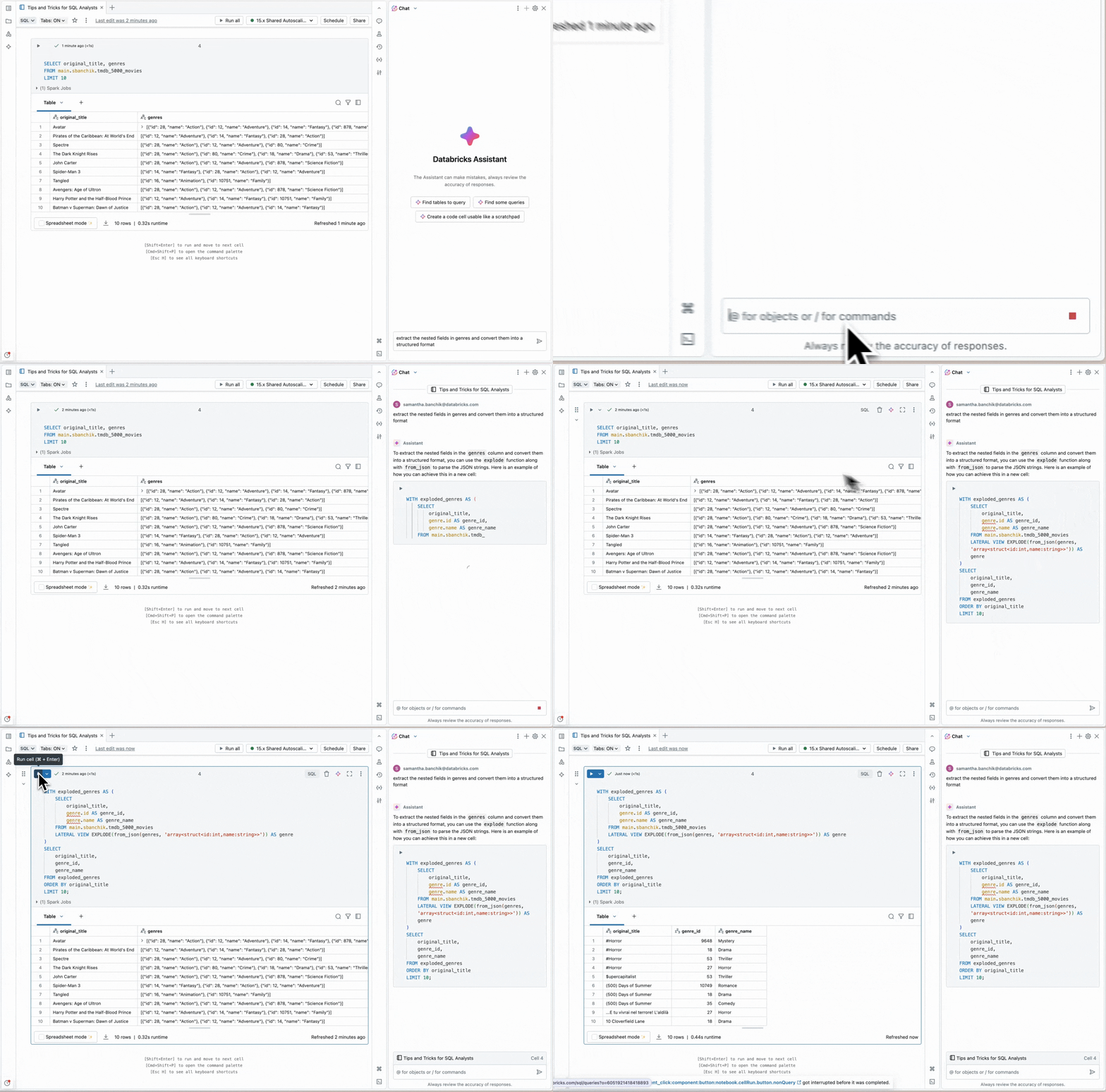
To ensure accurate results, you should first check the JSON structure in Catalog Explorer and provide a sample format that Genie Code could reference in a column comment. This extra step helped Genie Code generate a more tailored, accurate response.
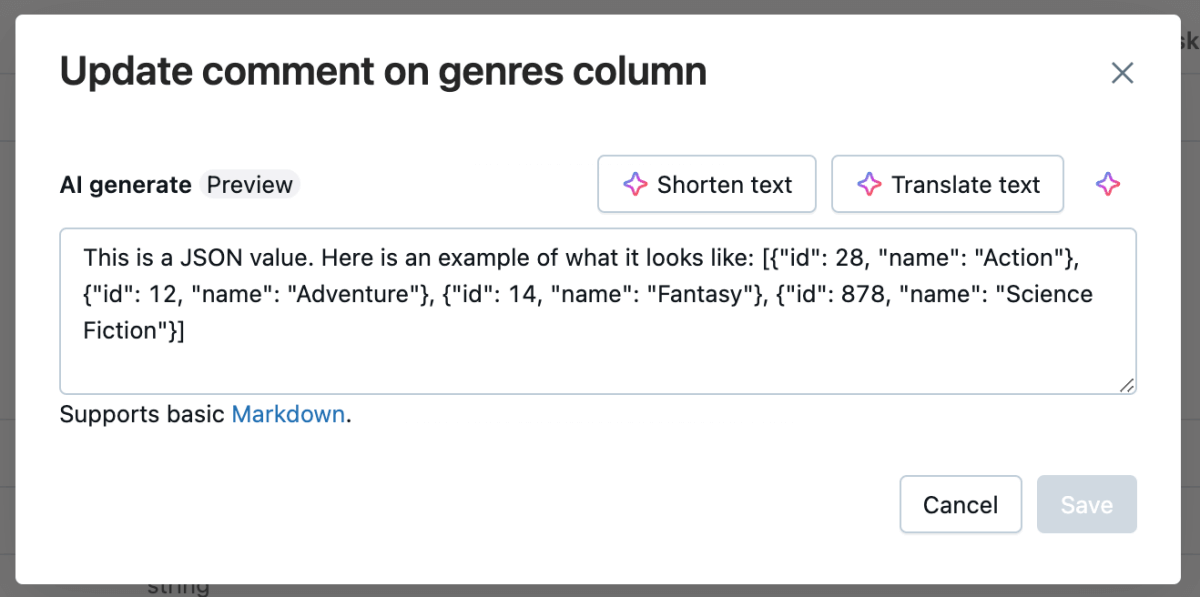
A similar approach can be used when attempting to generate regex expressions or complex SQL transformations. By first providing a clear example of the expected input format—whether it’s a sample JSON structure, text pattern, or SQL schema—analysts can guide Genie Code to produce more accurate and relevant suggestions.
Optimizing SQL Queries
In last year’s Genie Code Year in Review blog, we highlighted the introduction of /optimize, which helps refine SQL queries by identifying inefficiencies like missing partition filters, high-cost joins, and redundant operations. By proactively suggesting improvements before running a query, /optimize ensures that users minimize unnecessary computation and improve performance upfront.
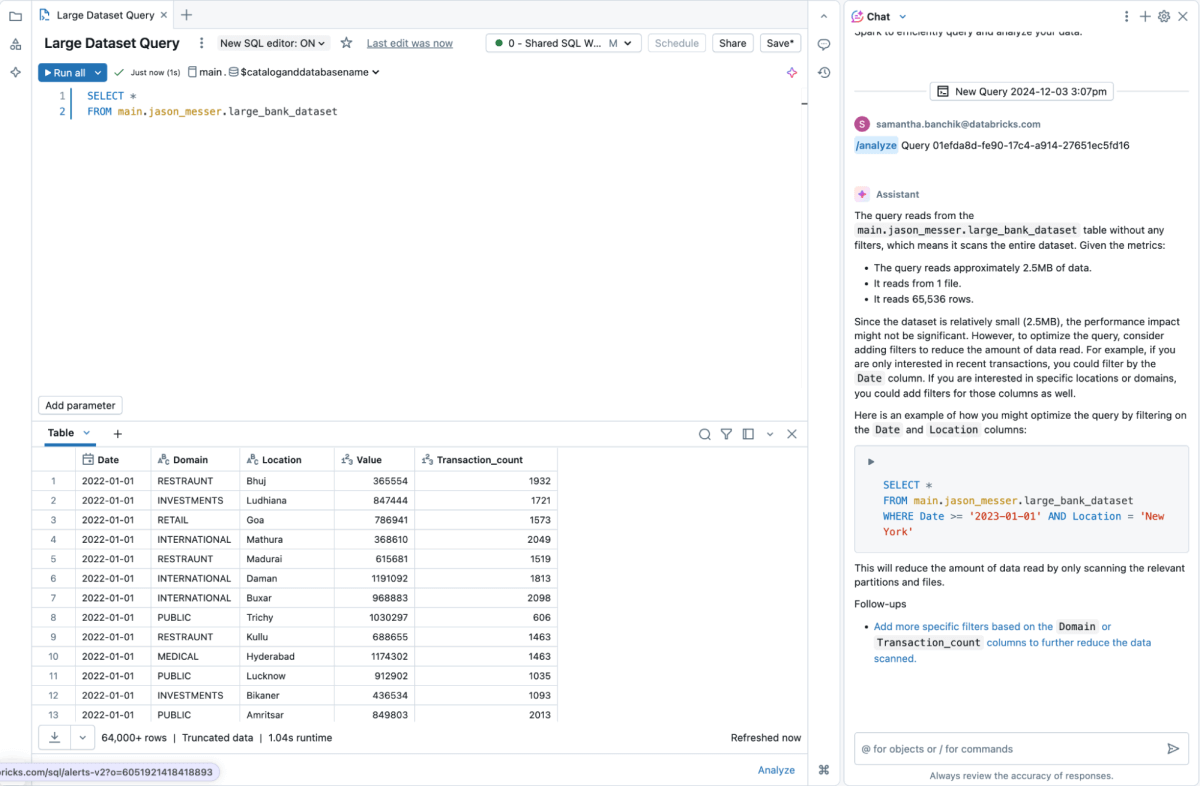
Now, we’re expanding on that with /analyze—a feature that examines query performance after execution, analyzing run statistics, detecting bottlenecks, and offering intelligent recommendations.
In the example below, Genie Code analyzes the amount of data being read and suggests an optimal partitioning strategy to improve performance.
Try Genie Code Today!
Use Genie Code today to describe your task in natural language and let Genie Code generate SQL queries, explain complex code and automatically fix errors.
Also, check out our latest tutorial on EDA in Databricks Notebooks, where we demonstrate how Genie Code can streamline data cleaning, filtering, and exploration.
Get the latest posts in your inbox
Subscribe to our blog and get the latest posts delivered to your inbox.