Lakehouse Business Data Models for Travel & Logistics
A library of production-ready, Silver-layer business data models—one per industry—that deploy directly into Unity Catalog as the analytical foundation of a Databricks lakehouse: complete, governed, and internally consistent on day one.
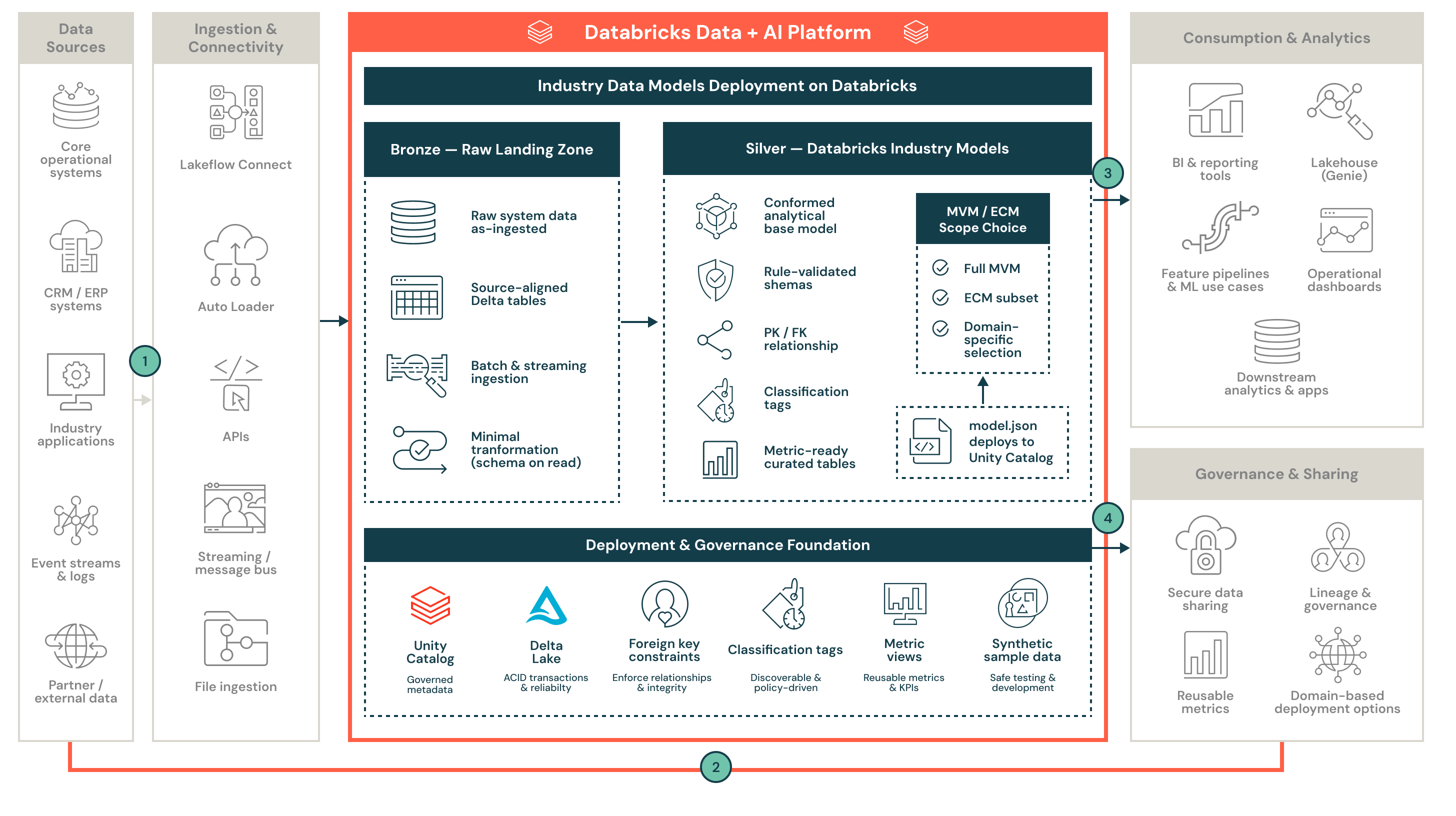
Databricks Lakehouse Business Data Models
Where it sits
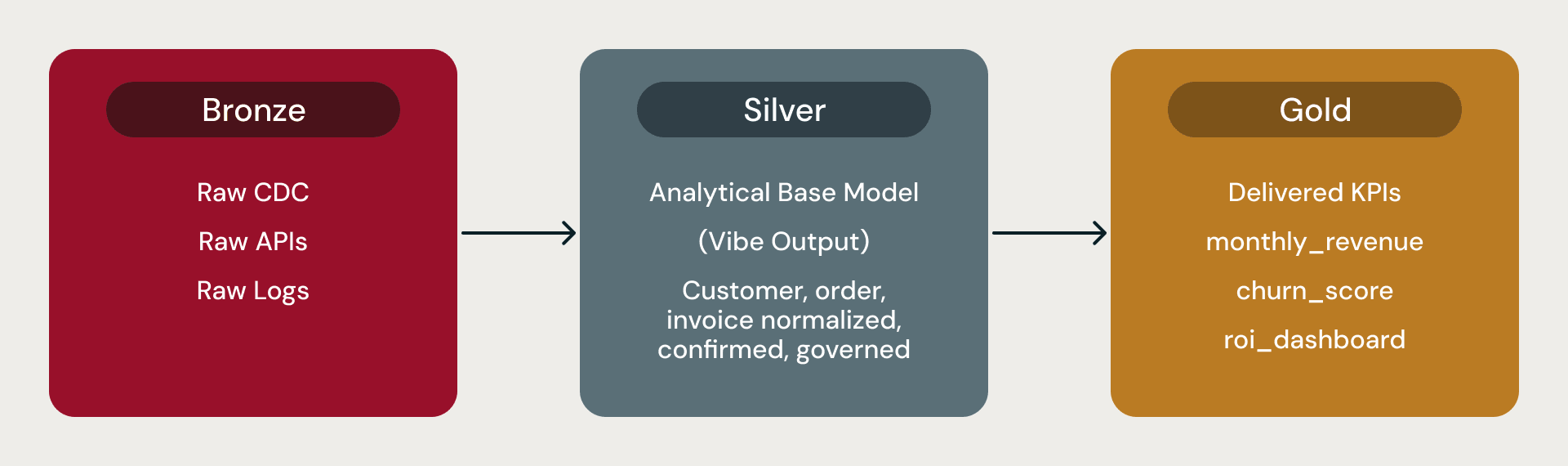
A Lakehouse Business Data Model is the Silver layer. Bronze handles raw ingestion (Lakeflow, Auto Loader). Silver is the conformed, normalized analytical model that every analyst, BI tool, and ML workload reads from. Gold is derived from insight (KPI tables, feature tables, aggregates) computed on top of Silver.
What ships with each model
Each model is published as a complete bundle.
`model.json` is the logical model that captures every domain, subdomain, product, attribute, foreign key, classification tag, and metric view definition. It is the unit of currency. Check it into git, diff across versions, and share across environments.
A Unity Catalog deployment of schemas, Delta tables, primary-key constraints, foreign-key constraints (informational), and classification tags. The exact catalog and schema names depend on the cataloging style chosen during installation.
Metric views are reusable KPI definitions installed on top of the physical tables, ready for AI/BI dashboards and AI/BI Genie.
An RDFS knowledge graph (ontology/) expresses the same model as a semantic graph for semantic-tooling integration and AI-agent grounding.
A DBML diagram (diagram/) for visual exploration in dbdiagram.io or any DBML-compatible viewer.
SQL DDL (schemas/) for the entire deployment, organized by schema.
Excel and Markdown documentation were generated alongside the model.
Optional synthetic sample data. Pool-based rows respect all foreign keys, regex constraints, and classification tags.
Hierarchy

Every model follows the same hierarchy. The organization is the whole business. It contains three divisions: Operations (what the business physically does), Business (who it serves and how it earns), and Corporate (the supporting back office). Each division contains one or more domains (one-word, lowercase, singular bounded contexts). Each domain contains two or more subdomains (two-word semantic groupings). Each subdomain contains products (the Delta tables). Each product contains attributes (the columns), with data types and classification tags assigned up front.
Operations and Business combined always hold at least 80% of the domains; Corporate is capped at 20%. This ratio keeps every model centered on what actually runs the business rather than on its administrative back office.
Every model is also a Directed Acyclic Graph by construction. Foreign keys always point child-to-parent (order.customer_id, never customer.latest_order_id); cycles are broken before publication; every domain connects to at least one other through foreign keys, so cross-domain analytics is always possible.
Two scopes: MVM and ECM

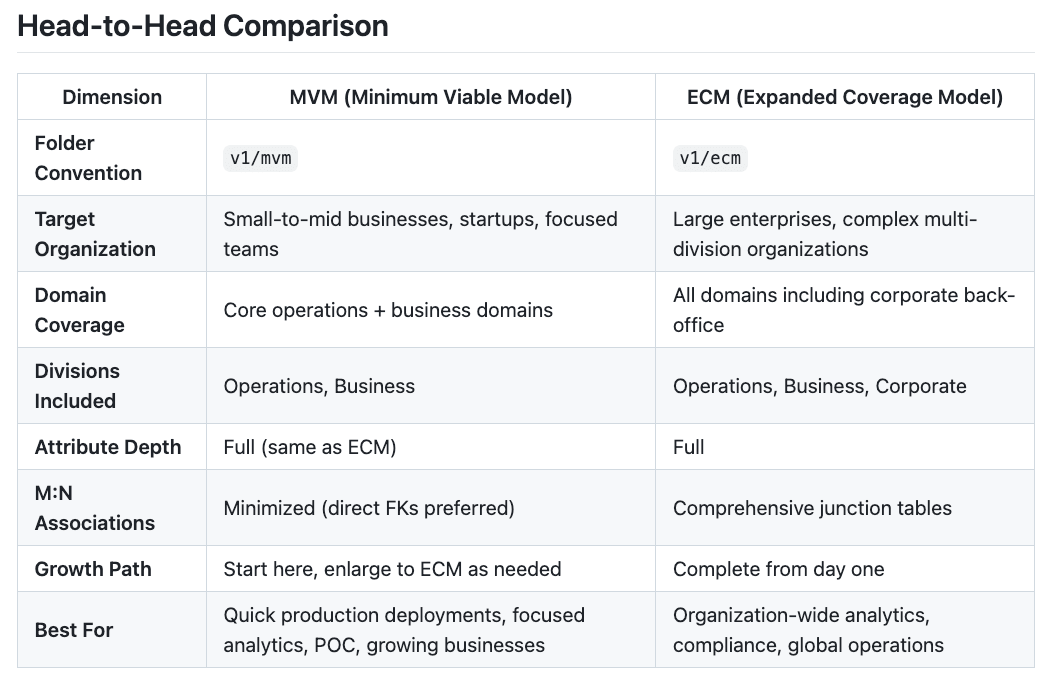
MVM (Minimum Viable Model) accounts for 30 to 50 percent of the ECM table count and covers only essential business functions, sized for SMB engagements, pilots, and dev/test environments.
ECM (Expanded Coverage Model) is a full enterprise breadth, including supporting Corporate domains, sized for Fortune 100 deployments. Attribute depth is identical across both scopes. MVM is not a skeleton, just a smaller surface area.
Let’s compare the MVM and ECM in more detail.
What is available to Travel and Logistics Industries
As a starting point, we currently have 4 models available as MVM or ECM. These models are:
| Industry | ECM Domains | ECM Products | MVM Domains | MVM Products |
|---|---|---|---|---|
| Airlines | 19 | 424 | 15 | 205 |
| Travel & Hospitality | 17 | 356 | 14 | 188 |
| Transport & Shipping | 19 | 514 | 14 | 210 |
| Shipping Ports | 19 | 395 | 14 | 186 |
Travel and Hospitality ~ an Example
Looking at the repo, you can see a comparison of the MVM and ECM Model types so you can make a good decision on which model scope you are interested in.
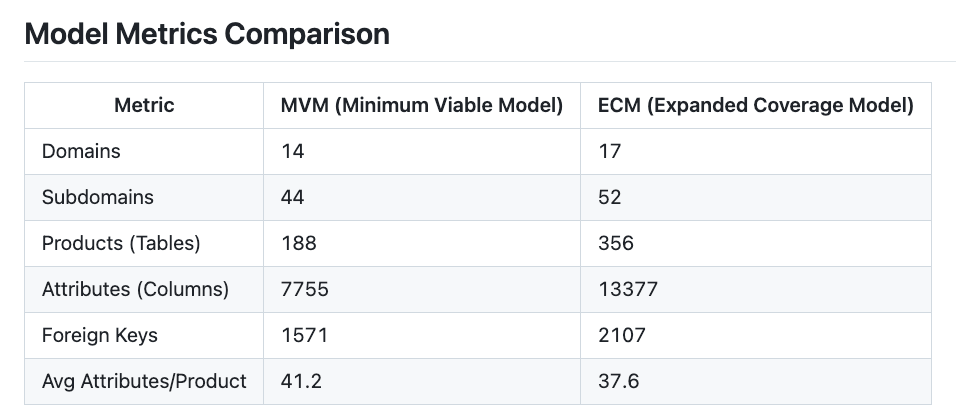
This includes a detailed review of the Domains and Products available.
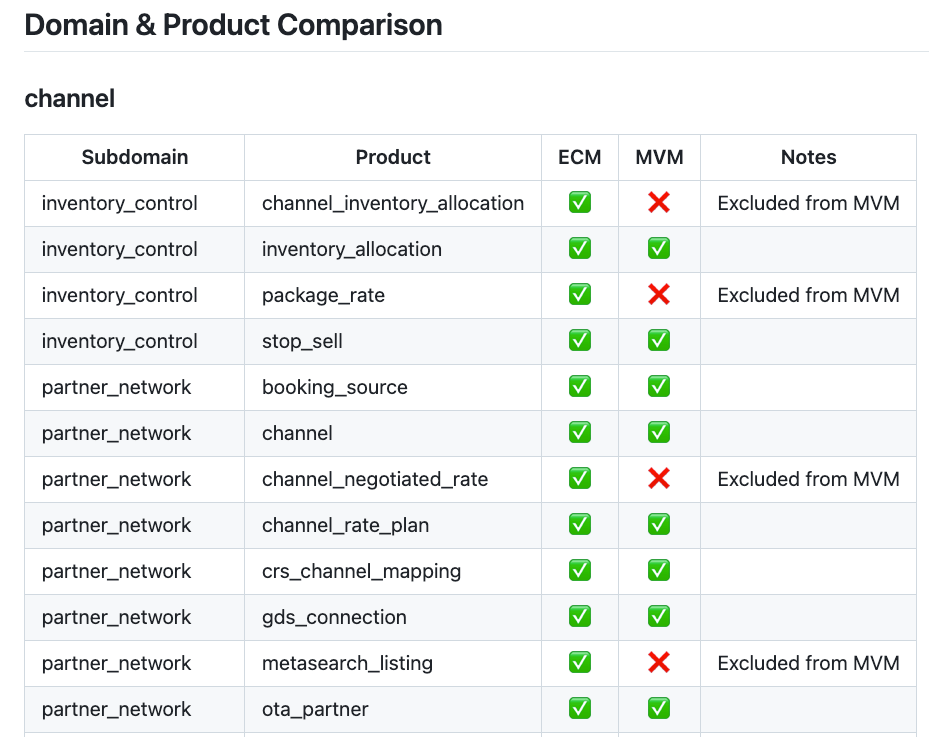
You can get details on what is a part of the selected model scope. This includes instructions, samples, documentation and release notes.

If you are ready to deploy the model in your environment, check out the readme in the main repo to walk through the steps. High level, all you need is to run the installer notebook pointed at the industry and model scope you are interested in.
Get started
The library lives in the Industry Solutions repo: https://github.com/databricks-industry-solutions/lakehouse-industry-data-models/tree/main. Pick a model, a scope (MVM or ECM), a cataloging style, a deployment catalog, and run the install notebook. A typical MVM install completes in tens of minutes, compared to Databricks Serverless, which takes under two hours. Both produce a fully deployed Silver layer in Unity Catalog with metric views ready for AI/BI dashboards and AI/BI Genie.
Every model is a starting point. Customers who need to adapt a model to their organization (rename domains, merge or split products, add a missing domain, change naming conventions) can do so using the Modeling Agent which iterates the model through natural-language directives.
Related resources
For more information, check out the first part in our Data Modeling blog release ~ Jumpstart your Data Modeling with Databricks Industry Data Models
Get Databricks Lakehouse Industry Data Models on GitHub ~ Lakehouse Industry Data Models on GitHub
